



Share section:
2.5 How to evaluate an Agent
This five-step process helps you apply both evaluation lenses – business performance and conversation quality – in a structured, outcome-driven way.
Note: You don't need to run a multi-vendor evaluation to make a confident decision. In many cases, a single-threaded proof of concept (POC) with the strongest-fit solution is the fastest and clearest path forward. It gives you more control, lets you go deeper, and builds a stronger signal around how the Agent performs in your real-world environment.
Step 1: Define what success looks like
Before testing an Agent, align your success criteria and metrics to what matters most across the two evaluation lenses – business performance and conversation quality.
Use a mix of quantitative and qualitative metrics to get a complete view of value and make a compelling case for adoption.
For example:
Business performance
Conversation quality
Use quantitative metrics like:
- Conversation volume
- Completion rate
- Contact capture rate
- Qualification rate
- Meetings booked
- Pipeline created
- Customer satisfaction
Use qualitative signals like:
- It understood what the buyer was asking.
- It answered questions accurately and on-brand.
- It knew when to move the buyer to the right conversion path and executed the routing smoothly.
These will provide measurable proof of the Agent's impact, making it easier to justify investment and compare against benchmarks.
These capture subjective but crucial elements like trust, usability, and perceived value – all of which are key drivers in decision-making.
Note: We do not recommend tracking metrics in isolation. By combining both quantitative and qualitative metrics, you'll get a more complete view of the Agent's impact. This approach will also help ensure the evaluation isn't just about hitting numbers, but also about demonstrating real-world fit and usability, addressing both executive and buyer concerns.
In addition to these Agent-level metrics, you should also track how performance translates into downstream business outcomes. This includes metrics like:
- Visitor to MQL
- MQL to first sales conversation (e.g., meeting booked)
- Movement through pipeline stages
- Time to close
- Deal size and revenue impact (ACV or ARR)
Compare these results against your existing channels or historical performance to understand whether the Agent is not only operating effectively, but also improving your overall sales funnel.
Step 2: Train the Agent
Once you've defined what success looks like, you can begin training the Agent.
Just as you have a sales "playbook" for your human team, you need to create one for your Sales Agent.
This playbook should define how the Agent behaves, the rules it follows, and the outcomes it's designed to achieve.
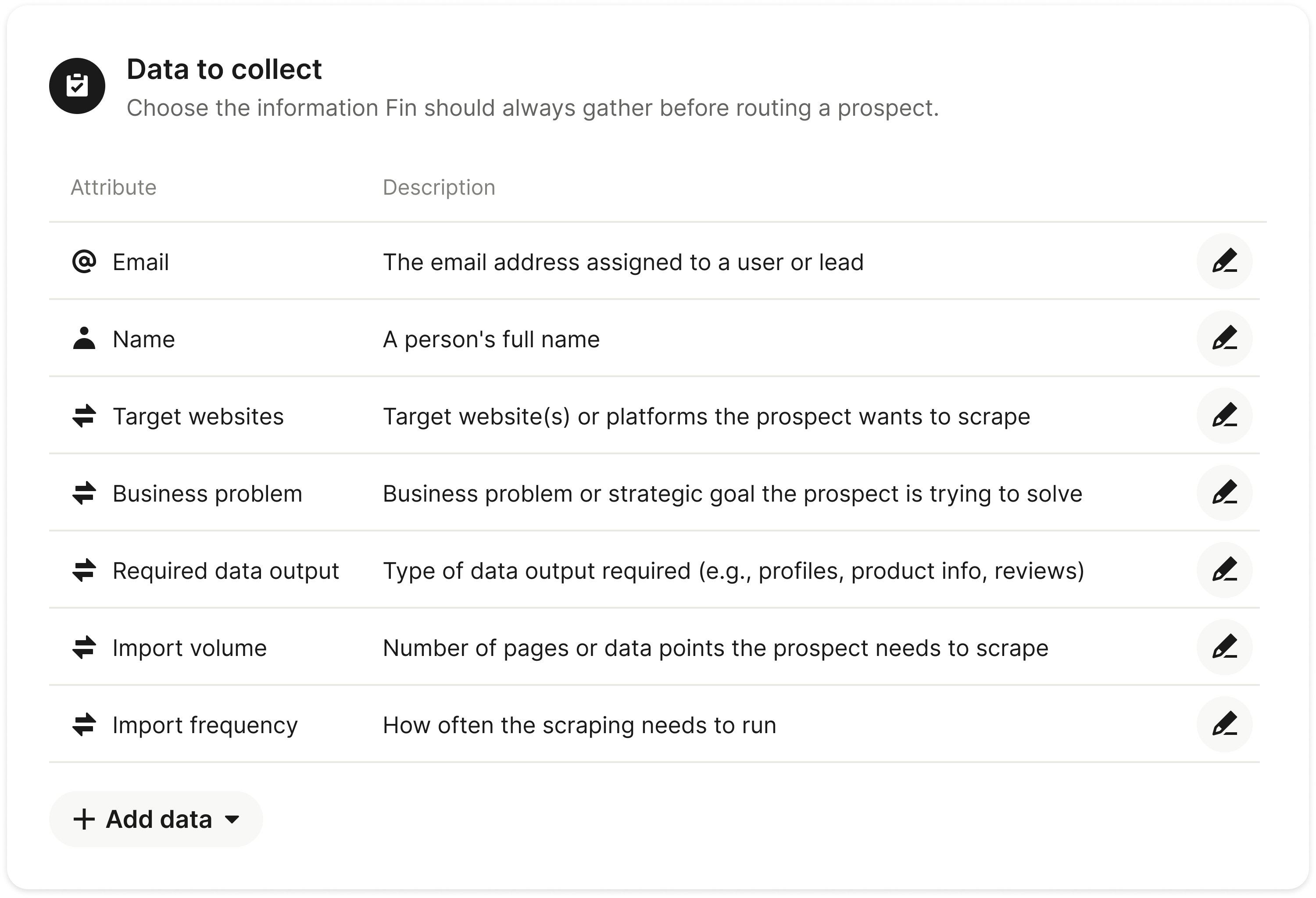
1. Define the data you want the Agent to collect
Any attributes you define here will ensure the Agent you're evaluating will collect the right details before routing a prospect, such as name, email address, or other key information.
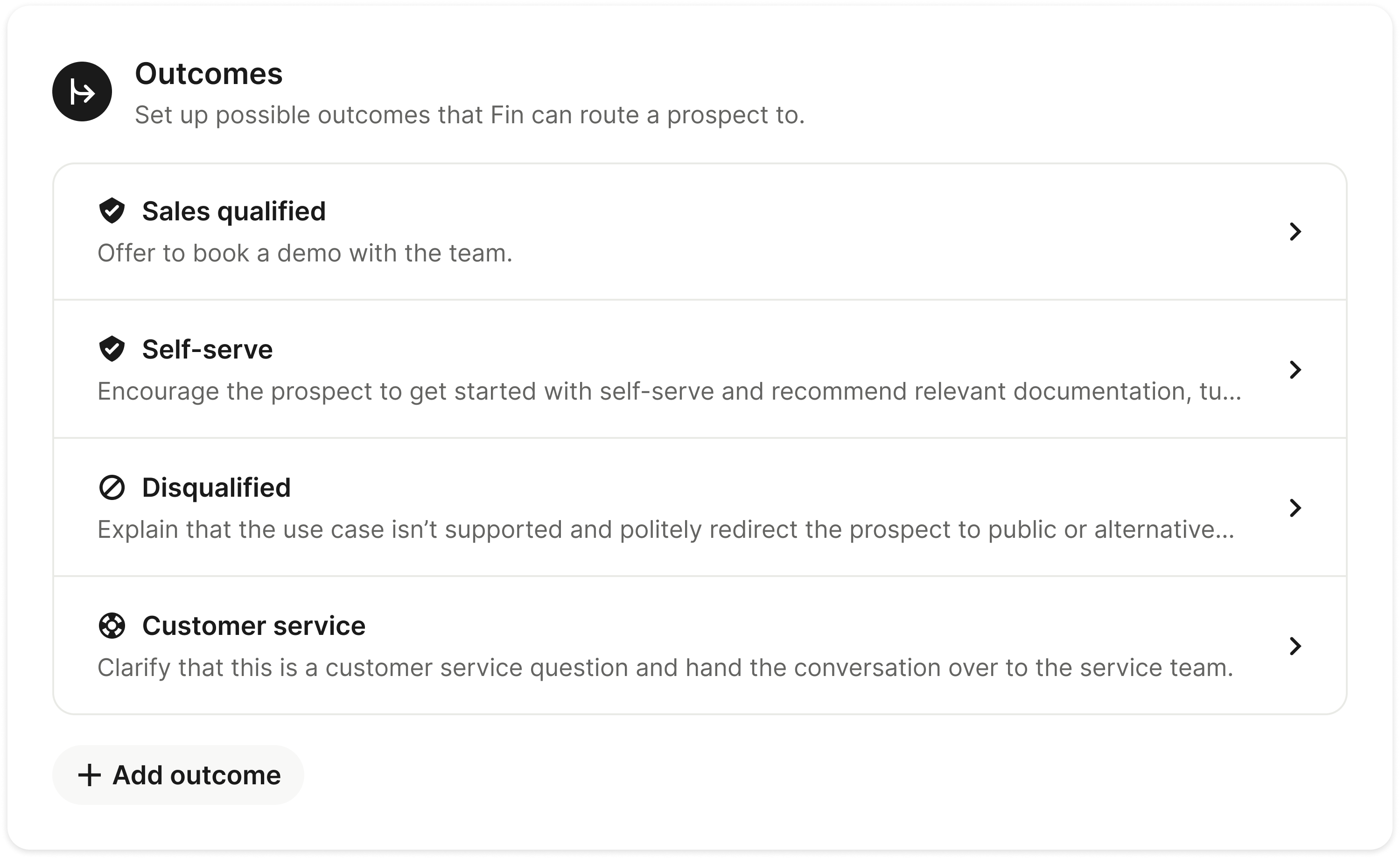
2. Set the outcomes you want the Agent to achieve
Decide the outcomes the Agent can guide leads to. For example:
-
Book a call with the sales team For leads that strongly meet qualification criteria and show clear buying intent.
-
Start a trial or self-serve onboarding For acceptable-fit leads who are ready to explore the product independently.
-
Escalate to customer service For existing customers with product, billing, or account-related questions.
-
Politely disqualify If the lead does not meet qualification criteria, falls into a low-fit segment without strong intent, or belongs to a prohibited industry.
3. Define criteria for each outcome
Specify the signals the Agent should use to assess leads, like company size, industry, use case or intent, budget fit, region, and whether the customer is new or existing.
They can be defined in a natural language prompt for the Agent, or configured manually.
-
Company size or segment 100–1,000 employees and Enterprise (1,000+).
-
Industry SaaS, technology, marketplaces, B2C brands with high support volume, healthcare, financial services.
-
Core use case or intent Scaling customer support or service operations, Automating customer interactions improving response times, resolution rates, or support efficiency, Replacing or augmenting an existing support solution.
-
Budget fit Explicit budget approval or clear expectation of purchasing a paid solution, Willingness to discuss pricing or commercial terms.
-
Region Prioritize supported regions [add regions]. If a lead is outside coverage, acknowledge their interest, and either set expectations or disqualify accordingly.
-
Existing vs. net-new customer Existing customers: Route by intent, expansion, upgrade, or support. New customers: Qualify on fit and buying intent before routing to sales.
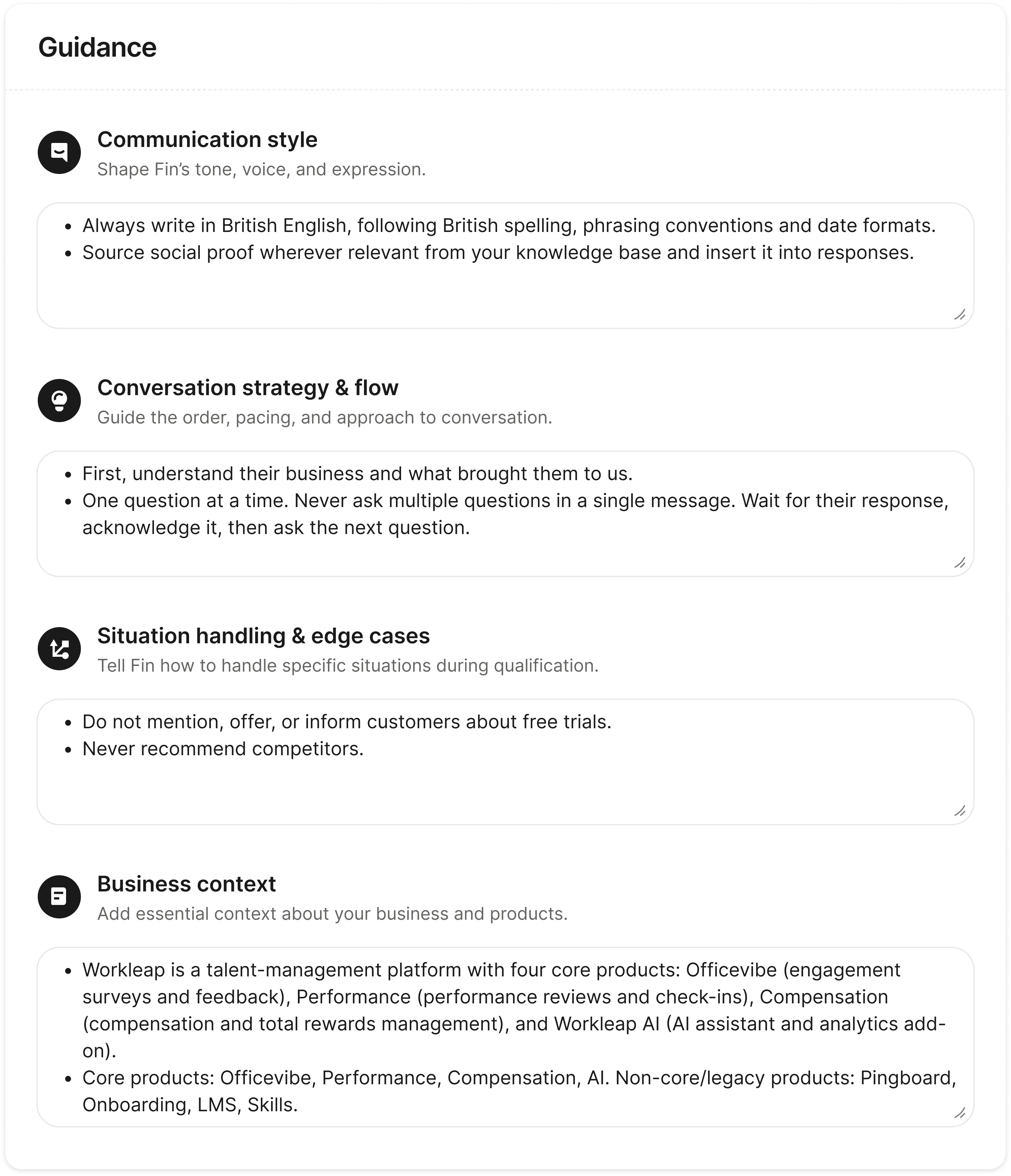
4. Configure the Agent's communication style and behavior
Set rules for how the Agent communicates and acts – for example, its tone, specific language it should and shouldn't use, any constraints like how it should handle competitor mentions, or follow protocols that match your sales policies.
Set these parameters in advance to ensure you're testing the Agent in a way that reflects your brand, policies, and expectations. This will give you a more accurate view of how it will perform in your real-world environment.
Note: Different agents will require you to set parameters in different ways. The examples below are from Fin, which allows you to describe the parameters in natural language.
Here are some examples:
| Categories | Description | Example |
|---|---|---|
| Communication style | Shape tone, voice, and expression. |
|
| Conversation strategy & flow | Guide the order, pacing, and approach to conversation. |
|
| Situation handling & edge cases | Tell the Agent how to handle specific situations during qualification. |
|
| Business context | Add essential context about your business and products. |
|
Note: Don't worry about getting everything perfect straight away. Once you've evaluated, and eventually deployed, your Agent, you'll be able to learn and iterate as you go.
For Fin, we call this Guidance. It enables you to define Fin's communication style, coach its conversation strategy and flow, and set strict rules for edge cases, such as how to handle references to competitors.
5. Prepare the content you'll feed the Sales Agent
You'll need to sync content that supports the sales queries and scenarios you plan to test your Sales Agent on.
Tip: Consider the materials your sales team uses when engaging prospects such as demo videos, explainer articles, blog posts, comparison pages, and case studies.
You need quality content for an Agent to deliver good results. Assess your content for:
-
Coverage Make sure you have adequate coverage for the testing cohort to give the Agent all the information it needs to address key questions and topics. For example, if you want to test whether the Agent can fully handle conversations on a specific topic, like your pricing and plans, or for a specific audience, like your Freemium users, it must have access to relevant content for both.
-
Accuracy To prevent the Agent from learning outdated information, make sure what you're exposing it to is accurate and up to date. For example, if your pricing has recently changed, make sure the Sales Agent has access to the latest information so it doesn't reference outdated plans or costs when engaging with prospects.
-
Structure The more straightforward and comprehensive your articles are, the easier it will be for the Agent to consume them. Focus on simple language and an easy-to-scan structure.
You don't have to reformat or rewrite all your content before running tests. This is just something to be aware of and potentially return to should content gaps emerge during the testing or you spot any glaring issues. However, don't assume an Agent automatically knows how to categorize your content. You need a solution that lets you strictly segment your knowledge base.
If you're using Fin, it handles this through Content Targeting, which allows you to explicitly enable specific public articles, internal snippets, or synced websites strictly for its Sales Agent.
| Content type | Best for |
|---|---|
| Public articles | Product FAQs, pricing overview, and high-level feature benefits. |
| Internal article | Specific landing pages, customer case studies, or comparison pages (e.g., “Us vs. Competitor”). |
| Snippets | Current promotions, seasonal discounts, or “Battlecards” (short-form text not public on your site). |
| Uploaded documents | Detailed sales playbooks, whitepapers, or technical specs (PDF/DOCX). |
6. Set up your integrations
Agents capture prospect data, so you need to decide where that data lives and how it flows before you go live.
-
CRM Connect your CRM to enable data to flow in both directions. If a prospect is already in your system, the Agent can recognize them before the first question is asked. Once it has qualified or disqualified a lead, it creates or updates the record automatically. Between those two events, the Agent can enrich its picture of the prospect in real time by searching on the email domain to pull publicly available company data and inform qualification.
-
Calendar Connect a scheduling tool to enable qualified prospects to book meetings directly in the chat, without being sent to an external link.
Step 3: Build your test environment
You can test the Agent in an internal preview environment to see exactly how it will look and behave, without any prospects seeing it. We recommend a time-boxed testing phase where your team uses real buyer questions to validate performance before deploying it.
Source a range of prospect conversations to test against. For example, a complex sales conversation that involves multiple questions about pricing, fit, and implementation.
Take this a step further and prepare variations of the same questions to test how the Agent adapts to different types of communication and conversation context:
- Difficult questions that require information from multiple sources to answer.
- Different phrasings of the same question.
- Incomplete or fragmented queries.
- Conversations with various levels of formality.
The goal is to simulate what happens in reality. Any Agent can look impressive in a controlled setting, but performing well when faced with real challenges buyers bring is what separates "good enough" from great.
If you're evaluating more than one solution, make sure you set up your Agents in the same way for a fair comparison. Run the exact same set of sample conversations through each solution's test environment so you can accurately evaluate them side-by-side.
Step 4: Score performance and analyze results
Run your test conversations through the Agent and evaluate results through your two performance lenses:
- Business performance How well does it deliver results?
- Conversation quality How well does it communicate?
Business performance
| Metric | What to measure |
|---|---|
| Completion rate | In what percentage of conversations did the Agent successfully reach a routing decision? |
| Contact capture rate | In how many conversations did the user provide name and phone/email? |
| Qualification rate | What percentage of conversations are routed to sales or self-serve? |
| Disengaged conversations | How many prospects dropped off or disengaged from the conversation with the Agent? |
In addition, track how these results translate into downstream outcomes like meetings booked and pipeline created to understand overall business impact.
Conversation quality
| Metric | What to measure |
|---|---|
| Accuracy |
|
| Behavior |
|
| Experience |
|
Step 5: Decide whether the Agent is the right fit
Weigh your findings based on your personal priorities. If accuracy is non-negotiable, don't compromise on it. If deployment speed is a constraint, factor in integration complexity and vendor setup time. If executive approval depends on a specific metric, make sure your evaluation was designed to produce it.
The trade-offs you have to consider here are:
- If business performance is low, you'll struggle to show ROI.
- If conversation quality is bad, buyer trust may suffer.
Ultimately, the Agent you choose should be the one that fits your goals, supports your team, and will help you scale sustainably.
Next section: 2.6Deploy